Finding your way around a college campus shouldn’t be a scavenger hunt. Yet for new students, visiting families, or community members attending an event, the Ivy Tech Evansville campus can feel disorienting without the right tools. The official Ivy Tech Evansville campus map is the key to stress-free navigation—but only if you know how to use it effectively and understand what it includes (and what it doesn’t).
This guide breaks down everything you need to know about the Ivy Tech Evansville campus map, from building locations and parking zones to accessibility features and real-world navigation tips. Whether you're attending your first class, visiting the advising center, or looking for the testing lab, this resource gives you the clarity most online searches miss.
Understanding the Ivy Tech Evansville Campus Layout
The Ivy Tech Community College Evansville campus sits on a 38-acre site at 3501 N. First Avenue, Evansville, IN 47710. It’s the largest of Ivy Tech’s southwestern Indiana locations and serves as a regional hub for academic, workforce, and community programming. Unlike sprawling university campuses with winding pathways and satellite buildings, Ivy Tech Evansville is designed for efficiency—but that doesn’t mean it’s instantly intuitive.
The campus consists of several interconnected and standalone buildings, spread across a well-paved, compact area. The main academic complex includes multiple wings connected by internal corridors, making it easy to move between classrooms, labs, and support offices. But if you're unfamiliar with the layout, it’s easy to mistake one entrance for another or end up circling the same parking lot.
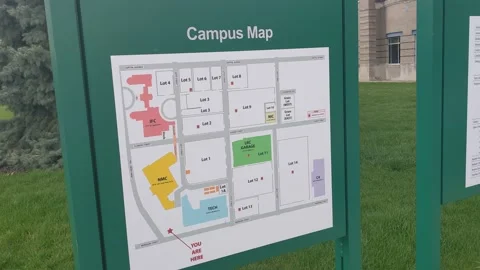
The official campus map (available on the Ivy Tech website) is a bird’s-eye view illustration showing all major buildings, parking areas, sidewalks, and key access points. It’s not a dynamic GPS-style app, but a static PDF or web graphic designed to orient users before arrival.
Pro Tip: Print the map or save it to your phone before you arrive. Cell service can be spotty near large concrete buildings, and relying on live data mid-navigation increases confusion.
Key Buildings and Their Functions
Knowing which building houses which service is half the battle. The campus map labels buildings, but doesn’t always clarify what’s inside. Here’s a breakdown of the major structures you’ll see:
Academic Building (Main Building)
This is the heart of campus. It includes: - Classrooms for general education and technical programs - Faculty offices - The Learning Commons (tutoring and academic support) - Student Services (advising, financial aid, registration) - Testing Center (for proctored exams and placement tests)
When new students say they “can’t find their class,” it’s usually inside this building. Rooms are labeled with prefixes like “AS” (Administrative Services) or “TC” (Technology Center), followed by a number. For example, TC115 is in the Technology wing, first floor.
Health Sciences Building Separate from the main building, this facility supports nursing, radiology, and other clinical programs. It features: - Simulation labs with mannequins and medical equipment - Anatomy and physiology classrooms - Faculty offices for health sciences instructors
Due to health privacy rules and lab scheduling, public access is restricted. Visitors need prior approval or must be enrolled students.
Public Safety and Technology Center Home to the criminal justice, cybersecurity, and information technology programs, this building includes: - Mock jail cells and courtroom simulation space - IT labs with network configuration stations - Police academy training rooms
It’s often used for dual-credit high school programs and workforce training. The entrance faces the west parking lot.
Advanced Manufacturing and Skilled Trades Facility
This newer addition supports hands-on learning in: - Welding - Precision machining - Electrical systems - HVAC
It features large garage-style doors, shop floors, and safety equipment stations. Students in these programs often wear uniforms or protective gear and may enter through rear loading docks.
Campus Map Parking Zones Explained
One of the most common frustrations is parking. The campus map includes color-coded zones, but the logic isn’t always obvious.
Here’s what the colors typically mean: - Blue Zones: Reserved for faculty, staff, and ADA-compliant spots - Gold Zones: Student parking (most common for daily use) - White Zones: Visitor and event parking - Green Zones: Reserved for specific programs (e.g., workforce training shuttles)
Common Mistake: Students assume any open spot is fair game. Unauthorized parking in blue or green zones can result in fines or towing—especially during high-traffic times like registration or finals week.
If you're visiting for an event, orientation, or advising appointment, use the visitor lot near the main entrance on N. First Avenue. Signs clearly mark “Visitor Parking” with a 2-hour limit. Exceeding the time without a permit risks a $25 citation.
How to Access and Use the Official Campus Map
The official Ivy Tech Evansville campus map is hosted on the college’s website under “Campuses” > “Evansville” > “Campus Map.” It’s available as a downloadable PDF and a web-based image.
Steps to Access:
- Go to ivytech.edu
- Select “Campuses” from the top menu
- Choose “Evansville”
- Click “Campus Map” in the sidebar
- Download or view online
The PDF is optimized for printing and includes a scale, legend, and emergency contact numbers. Some users report difficulty finding the link because it’s not prominently displayed on the homepage—this is a known usability gap.
Workflow Tip: Save the direct URL to your phone’s home screen as a bookmark. Search engines often return outdated or third-party versions of the map that lack current details.
Limitations of the Current Map
While functional, the map has drawbacks: - No real-time updates (e.g., closed pathways during construction) - No indoor floor plans - Not mobile-responsive in interactive format - Minimal accessibility annotations beyond ADA parking
For students with mobility challenges, the map doesn’t indicate ramps, elevator locations, or quiet zones. You’ll need to contact Student Accessibility Services directly for detailed accommodations.
Navigating Without the Map: On-Ground Strategies
Even the best map fails if you’re already lost. Here are practical tactics used by returning students and staff:
1. Use Landmarks
- The flagpole near the main entrance marks the central hub
- The glass atrium in the Academic Building is visible from most angles
- The red-roofed Health Sciences Building stands out from the rest

2. Follow the Color-Coded Floors Inside the main building, floor tiles and signage use color zones: - Red: Advising and enrollment - Blue: Testing and computer labs - Green: Library and study areas
This system helps when you’re running late and need to pivot quickly.
3. Ask at the Welcome Desk Located just inside the main entrance, the Welcome Desk staff can: - Print a map on demand - Provide building-specific directions - Call ahead to offices on your behalf
They’re often overlooked, but they’re the fastest way to correct a navigation error.
Events and Special Access: When the Map Isn’t Enough
The standard campus map doesn’t account for temporary changes during high-traffic events. Examples include: - New Student Orientation: Additional check-in tents in the south quad - Career Fair: External vendors set up in the gymnasium (not labeled on map) - Commencement: Traffic rerouting and reserved seating zones
In these cases, event-specific maps are distributed via email or posted at campus entrances. Always check your Ivy Tech student email or the Events calendar before visiting during peak periods.
Realistic Use Case: A parent attending graduation might park in the visitor lot, only to find it cordoned off for shuttle use. Without checking event details, they waste 20 minutes searching for a spot. Proactive planning avoids this.
Digital Alternatives and Tools for Enhanced Navigation
While Ivy Tech Evansville doesn’t currently offer a dedicated campus navigation app, students use third-party tools to supplement the official map.
Recommended Tools:
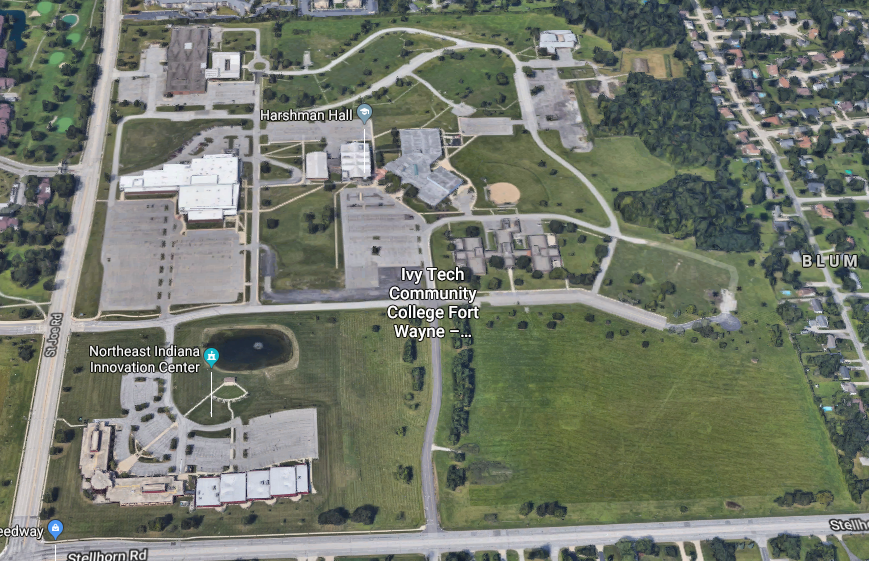
- Google Maps (Satellite View)
- - Pros: Accurate aerial view, live traffic, street-level photos
- - Cons: Doesn’t show building interiors or room numbers
- - Best for: First-time visitors driving to campus
- Apple Maps + Notes App
- - Pros: Offline access, custom pin placement
- - Cons: Limited building detail
- - Best for: Saving frequently visited spots (e.g., your classroom)
- Ivy Tech Student Portal (MyIvy)
- - Pros: Class schedule links to building codes (e.g., “AS104”)
- - Cons: No visual map integration
- - Best for: Cross-referencing room locations
- Printed Map + Highlighter
- - Pros: No battery needed, customizable
- - Cons: Static, no updates
- - Best for: Orientation week or test days
- Campus Tour Videos (YouTube)
- - Pros: Walk-through views of key areas
- - Cons: Quality varies, not official
- - Best for: Visual learners preparing for first visit
There’s growing demand for an interactive map with clickable rooms and turn-by-turn directions—similar to apps used by universities like Purdue or IU. Until Ivy Tech implements one, combining the official map with these tools delivers the best experience.
Final Tips for Stress-Free Campus Navigation
Mastering the Ivy Tech Evansville campus map isn’t just about geography—it’s about strategy. Arrive early for your first few visits. Use the map to pre-walk your route from parking to classroom. Save emergency contacts: Campus Security (812-429-9005) and the Welcome Desk (812-429-9200).
For students in online/hybrid programs, a single on-campus visit can feel overwhelming. Reduce anxiety by doing a dry run during off-hours—weekend mornings are quiet and ideal for orientation.
The campus map is a starting point, not the full solution. Pair it with human resources, digital tools, and common sense, and you’ll move through campus like a veteran.
Frequently Asked Questions
Where is the main entrance at Ivy Tech Evansville? The primary entrance is on N. First Avenue, marked by a flagpole and glass atrium leading into the Academic Building.
Is parking free at Ivy Tech Evansville? Yes, but only in designated student and visitor zones. Unauthorized parking in restricted areas may result in fines.
Does the campus map show indoor layouts? No, the official map is an outdoor site plan only. Floor plans are available inside buildings or through department offices.
How do I find my classroom on the first day? Check your schedule on MyIvy for the building and room number, then use the color-coded zones and hallway signs to locate it.
Is the campus wheelchair accessible? Yes. All buildings have ADA ramps, elevators, and accessible restrooms. Contact Student Accessibility Services for detailed assistance.
Can visitors use the library? Yes, the Learning Commons is open to the public during operating hours, though borrowing privileges are limited to students and staff.
Are there food options on campus? Yes—there’s a snack bar in the Academic Building and vending areas in most buildings. No full cafeteria, so many students bring meals.
FAQ
What should you look for in Ivy Tech Evansville Campus Map Guide for Students and Visitors? Focus on relevance, practical value, and how well the solution matches real user intent.
Is Ivy Tech Evansville Campus Map Guide for Students and Visitors suitable for beginners? That depends on the workflow, but a clear step-by-step approach usually makes it easier to start.
How do you compare options around Ivy Tech Evansville Campus Map Guide for Students and Visitors? Compare features, trust signals, limitations, pricing, and ease of implementation.
What mistakes should you avoid? Avoid generic choices, weak validation, and decisions based only on marketing claims.
What is the next best step? Shortlist the most relevant options, validate them quickly, and refine from real-world results.